Best 8-Bit Music Maker Online: How to Choose a Chiptune Tool
If you are looking for an 8-bit music maker, the best starting point depends on whether you want a quick browser sketch, a richer chiptune editor, or a full desktop production workflow. For most beginners who want to make 8-bit music online, UltraBox is a practical middle ground: open it in a browser, build an eight-bar loop, and then decide whether you need extra channels, FM synthesis, or custom samples. This guide compares the main paths so you can choose a tool before spending time learning the wrong workflow.

In This Guide
The Quick Answer: Start in the Browser, Then Scale Up
A good chiptune music maker should let you hear an idea quickly, understand which channel is doing what, and save the project before you experiment. That is why a browser editor is often a better first step than a large digital audio workstation. You can test a melody, bass line, drum pattern, and simple arrangement without installing plug-ins or learning a full mixing console.
Use UltraBox when you want an online chiptune editor with room to grow. Use the original BeepBox editor when the smallest possible sketching workflow matters most. Choose a desktop DAW when you already know you need recording, audio tracks, plug-ins, detailed mixing, or live performance tools. The right choice is the one that matches your next project, not the one with the longest feature list.
What Should an 8-Bit Music Maker Include?
The phrase “8-bit music maker” can describe a tiny step sequencer, a BeepBox-style note grid, a sound-design playground, or a complete production application. Before comparing brands, check the practical workflow underneath the label. These are the capabilities that change what you can actually finish.
| Capability | Why it matters | Beginner test |
|---|---|---|
| Fast note entry | A small idea should become audible in minutes, not after a long setup process. | Can you write a short melody and hear it immediately? |
| Clear channel roles | Lead, bass, harmony, and drums are easier to arrange when each lane has a readable job. | Can you mute one role and understand what changed? |
| Pattern and song structure | A loop is useful, but a finished track needs repeated sections, variation, and an ending. | Can you turn an eight-bar idea into a larger form? |
| Sound design headroom | Simple pulse and noise sounds are enough to begin; FM, samples, and modulation help later. | Do advanced controls add a real option or only visual clutter? |
| Reliable saving | A great sketch is not useful if you cannot reopen, export, or archive it. | Can you save a complete link or project backup before closing? |
Best 8-Bit Music Maker Options by Workflow
There is no universal winner. The table below separates the common choices by the job they are best at. It is deliberately practical: you can start with the first row and move down only when your project asks for more.
| Option | Best fit | Strength | Trade-off |
|---|---|---|---|
| UltraBox | Beginners who want a browser tool that can grow with a project | Expanded channels, FM synthesis, custom samples, themes, modulation, and an online editor | More choices mean you should begin with a small channel plan instead of exploring everything at once |
| BeepBox | Fast sketches, simple lessons, and sharing a small song idea | Small learning surface and a direct note-grid workflow | You may outgrow the available sound or arrangement scope for a larger project |
| JummBox or another focused fork | Users who want a specific fork’s sound or workflow | Distinct instruments and controls can suit a particular style | Compatibility, menus, and saved-song behavior can differ between forks |
| Desktop DAW | Recording, plug-ins, multitrack mixing, and production beyond chiptune notes | Broad audio and mixing ecosystem | More setup, more decisions, and a steeper first-session learning curve |

Why UltraBox Is a Strong Starting Point
UltraBox sits between a minimal sketch tool and a full DAW. The homepage opens the editor directly in the browser, so you can begin with the same small melody-and-rhythm exercise used in a simpler BeepBox workflow. When the idea grows, UltraBox gives you more room for channels, custom samples, FM sound design, themes, and modulation. That makes it a useful answer for people searching for an online 8-bit music maker rather than a one-purpose effect or audio converter.
The extra features are helpful only when they solve a real project problem. If the song is still a four-bar idea, do not add six new layers just because the editor offers them. Begin with one lead, one bass, one support part, and one noise or drum role. Once the arrangement is readable, decide whether a sample, FM patch, or extra channel improves the song.
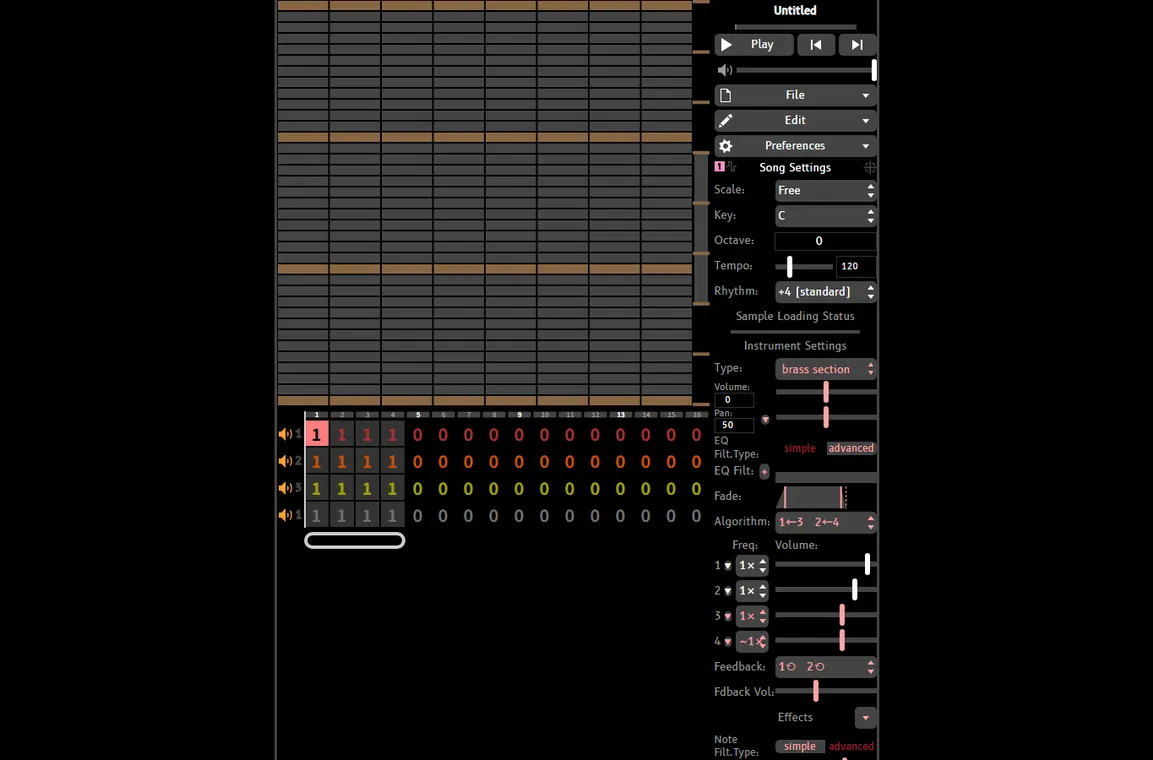
For feature details, see the UltraBox features guide. If your choice depends on custom audio, read the UltraBox samples guide before importing anything. If you are comparing forks rather than choosing a general 8-bit music maker, use the BeepBox mods guide and the focused UltraBox vs BeepBox comparison.
Make Your First Eight-Bar Loop
A short loop is the quickest way to test whether an 8-bit music maker feels right. You do not need a complete song for the first comparison. You need enough material to judge note entry, sound choice, channel clarity, and saving.
- Choose a tempo and a simple scale. Keep the first exercise comfortable. A steady tempo makes it easier to hear whether the tool responds cleanly to note edits.
- Write a four- or eight-note lead. Use a pulse or square-like voice and leave space between phrases. A readable melody reveals more than a dense wall of notes.
- Add a supporting bass role. Follow the main movement with fewer notes. If the bass makes the lead hard to hear, shorten it before changing every instrument.
- Use one compact drum pattern. A kick or low pulse, a contrasting backbeat, and a few high ticks are enough. The BeepBox drums guide explains how to build this layer without filling every step.
- Turn the loop into two sections. Repeat the idea once, then remove or change one part. This tests whether the editor can support arrangement instead of only a static loop.
- Save before exploring. Copy the complete song URL or make a project backup using the UltraBox save workflow. A tool is much easier to trust after you have reopened the work successfully.
This test also clarifies whether you need a larger application. If you want to write authentic chiptune parts, continue with how to make chiptune music. If you are trying to transform an existing recording, read the song-to-8-bit workflow first; an audio effect is not the same as rebuilding an editable arrangement.
When Another Tool Fits Better
Choose a smaller editor for the smallest possible learning curve
BeepBox is a good choice when the goal is a quick sketch, a classroom exercise, or a small shared song. Its narrower workflow can be an advantage: fewer controls make it easier to focus on melody, rhythm, and pattern repetition. Start there if extra sound-design options would distract you from finishing the first loop.
Choose a focused fork for a specific sound or compatibility need
JummBox and other BeepBox-family forks may be the right answer when a particular instrument set, effect, or community workflow matters more than a general-purpose tool. Check the fork’s current editor and saved-song behavior before moving an important project. The JummBox vs UltraBox guide is a useful next comparison when the decision is specifically between those two editors.
Choose a desktop DAW when the project is really an audio-production project
A DAW is the better fit for microphones, multiple audio recordings, plug-in chains, detailed automation, mastering, or live performance. It is not automatically a better 8-bit music maker for a beginner. If the core task is entering chiptune notes and shaping a few chip voices, a browser editor usually gives you a faster path to a finished idea.
A 30-Second Decision Checklist
- Want to make a small idea immediately? Start with a browser editor.
- Need more channels, FM synthesis, custom samples, or modulation? Try UltraBox.
- Want the smallest possible interface for a sketch or lesson? Try BeepBox.
- Need one fork’s special instruments or saved-song ecosystem? Compare that fork directly.
- Need recording, plug-ins, and detailed audio mixing? Use a desktop DAW.
- Not sure yet? Make the same eight-bar loop in one browser session before installing anything larger.
FAQ
What is the best 8-bit music maker for beginners?
A browser-based editor is usually the easiest starting point because you can test the workflow immediately. UltraBox is a practical choice when you want a simple first loop plus more room for channels, FM synthesis, samples, and longer arrangements.
Can I make 8-bit music online without a DAW?
Yes. An online chiptune editor can handle note entry, instruments, patterns, and sharing from the browser. You only need a full DAW when you want broader recording, mixing, or plug-in workflows.
Is an 8-bit music maker the same as an audio converter?
No. A music maker lets you write or arrange notes and sound roles. A converter or bitcrusher processes an existing recording and does not automatically rebuild its melody, bass, harmony, or drums as editable chiptune parts.
Should I start with BeepBox or UltraBox?
Start with BeepBox when you want the smallest learning surface and a quick sketch. Choose UltraBox when you expect to use more channels, custom samples, deeper FM controls, or a larger project.
Official Sources
- Official BeepBox editor — use the current browser editor when you want to test a minimal sketching workflow.
- Official UltraBox editor — open the browser-based UltraBox experience directly.
- UltraBox source repository — check project source and current release context.
Try an 8-Bit Music Maker in Your Browser
Open UltraBox, make one short lead-and-rhythm loop, and judge the workflow by how quickly you can hear, change, and save the idea.