UltraBox vs BeepBox: Which Editor Fits?
If you've spent any time in the chiptune community, you've almost certainly bumped into both BeepBox and UltraBox. They share the same DNA — the same grid-based note editor, the same URL-based song sharing, the same zero-install philosophy — yet they feel like completely different instruments once you dig in. One is a beautifully minimal sketchpad; the other is a full production suite hiding behind a familiar interface.
If you searched for ultrabox beepbox, beepbox ultrabox, or BeepBox vs UltraBox, the short answer is that UltraBox is a modern BeepBox-family editor built for users who want more channels, deeper synthesis, custom samples, and offline options while keeping the familiar grid workflow.
I've been making chiptune music for a few years now, and I've watched this ecosystem grow from a handful of quirky browser tabs into a surprisingly rich creative space. This guide is my honest, detailed breakdown of what separates these two tools in 2026 — so you can stop second-guessing and start making music.
UltraBox vs BeepBox: Quick Answer
BeepBox is the original — clean, fast, and perfect for beginners or anyone who wants to sketch a melody in two minutes without reading a manual.
UltraBox is a BeepBox mod that integrates features from 30+ other mods: 32 channels, 6-operator FM synthesis, custom sample import, 40+ themes, and much more. It's the better choice for anyone who has outgrown vanilla BeepBox and wants professional-grade tools without leaving the browser. In other words, BeepBox vs UltraBox is mainly a simplicity-versus-control decision, not a question of which editor is universally best.
What is BeepBox?
BeepBox was created by John Nesky (known online as "shaktool") and first released in February 2012. It started as a Flash-based toy for sketching melodies, and over the years it quietly evolved into one of the most beloved browser-based music tools on the internet. Today it runs on version 4.2.2 (2025), entirely in JavaScript, with no account required and no data ever leaving your device — your entire song lives in the URL.
The philosophy behind BeepBox has always been accessibility first. You open the page, click a few squares on the grid, and music plays. There's no onboarding, no tutorial wall, no subscription prompt. That simplicity is genuinely rare, and it's why BeepBox has become a go-to tool in music classrooms, game jams, and hobbyist communities worldwide.
According to the Wikipedia article on chiptune, the genre is defined by its embrace of the constraints of early sound hardware — and BeepBox captures that spirit perfectly. Its limited palette forces you to focus on melody and rhythm rather than sound design, which is actually a wonderful creative constraint.
BeepBox's current feature set (v4.2.2)
- Up to 15 simultaneous channels (10 pitch + 5 drum)
- Synthesis types: chip waves, FM, harmonics, pulse waves, supersaw
- Effects: reverb, chorus, distortion, bitcrusher, tremolo, EQ, panning, vibrato
- Export: WAV, MP3 (192 kb/s), MIDI, JSON, HTML
- Offline version available for download
- All song data stored in the URL — no server, no account
- Open-source under the MIT license
What BeepBox doesn't have: custom sample import, visual themes, automation channels, or advanced FM operators. Those gaps are exactly what the mod community — and UltraBox in particular — was built to fill.
What is UltraBox?
UltraBox was conceived by Neptendo and built primarily by Main, with contributions from a growing team including LeoV, Mid, choptop84, and Slarmoo. It launched in June 2023 with a single, ambitious goal: "Combine every single BeepBox mod into one."
That's not marketing copy — it's a literal description of the project. The BeepBox ecosystem had spawned dozens of forks over the years: JummBox added mod channels and expanded channel counts; GoldBox refined the UI; AbyssBox brought custom themes; PaandorasBox introduced custom sample import in late 2021. Each mod solved a different problem, but using them meant choosing one and giving up the rest. UltraBox changed that.
The result is a tool that feels familiar to any BeepBox user — same grid, same URL sharing, same zero-install experience — but with a depth that reveals itself gradually. As one user in the Scratch community put it: "Ultra box has a lot lot lot lot more hiding under the surface. You just gotta look for those things."
UltraBox's headline features
- 32 channels (vs BeepBox's 15) — pitch, drum, and mod channels
- 6-operator FM synthesis with 32 algorithms — the most advanced FM in any BeepBox mod
- Custom sample import via URL (WAV, MP3, OGG) — host your audio anywhere and paste the link
- 6 built-in sample libraries: Kirby, Mario Paint, Nintaribox, Wario, Drum Samples, Legacy
- 40+ visual themes — from AbyssBox Dark to Wacky, with a custom theme editor
- Mod/automation channels — automate tempo, pitch, volume, filter in real time
- PWM synthesis, Euclidean rhythm generator, harmonics editor, spectrum editor
- Offline version with full custom sampling support (OS-specific builds available)
- MIDI import/export, multiple layout options, microtonal archive version
Side-by-Side Feature Comparison
Here's the full picture at a glance. I've included JummBox as a reference point since it's the most popular intermediate mod and the direct ancestor of UltraBox.
| Feature | BeepBox | JummBox | UltraBox ✨ |
|---|---|---|---|
| Max channels | 15 (10 pitch + 5 drum) | ~40 pitch | 32 (pitch + drum + mod) |
| FM synthesis | Basic (4-op style) | 4-op | 6-op, 32 algorithms |
| Custom sample import | ✗ | ✗ | ✓ (URL-hosted) |
| Built-in sample libraries | ✗ | ✗ | ✓ (6 libraries) |
| Visual themes | ✗ (single theme) | Limited | ✓ (40+ themes) |
| Mod / automation channels | ✗ | ✓ | ✓ |
| PWM synthesis | ✗ | ✗ | ✓ |
| Euclidean rhythm generator | ✗ | ✗ | ✓ |
| Offline version | ✓ | ✗ | ✓ (with sampling) |
| WAV / MP3 / MIDI export | ✓ | ✓ | ✓ |
| Open-source (MIT) | ✓ | ✓ | ✓ |
| Learning curve | Low ⭐ | Medium | Medium ⭐⭐ |
| First released | 2012 | 2019 | 2023 |
| Created by | John Nesky | Jummbus | Neptendo + Main |
Key Differences Explained
1. Channels: 15 vs 32
This is the first wall most BeepBox users hit. You're building a track, you want to add a counter-melody, a pad, and a second drum layer — and suddenly you're out of channels. BeepBox caps you at 15 (10 pitch, 5 drum). UltraBox gives you 32, split across pitch, drum, and mod channels.
For simple melodies and short game loops, 15 channels is plenty. For anything resembling a full arrangement — verse, chorus, bridge, multiple instrument layers — 32 channels is a meaningful upgrade. It's the difference between writing a sketch and writing a song.
2. FM Synthesis: Basic vs 6-Operator
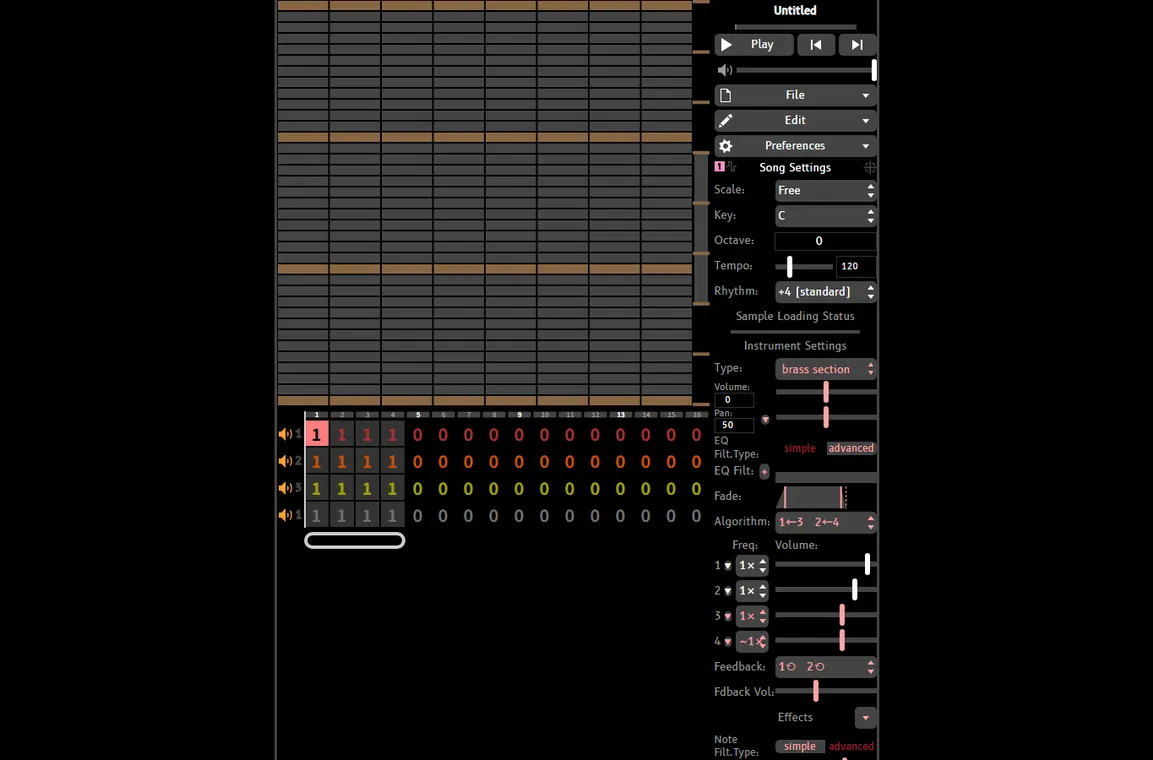
Both tools support FM synthesis, but they're not in the same league. BeepBox's FM is a simplified 4-operator implementation — great for classic electric piano and bell sounds, but limited in complexity. UltraBox's 6-operator FM engine, with 32 selectable algorithms and feedback control, is closer to a Yamaha DX7 in a browser tab.
If you've ever wanted to recreate the brass stabs from a Mega Drive soundtrack, the metallic percussion from a PC-88 game, or the glassy pads from early 90s JRPG music — UltraBox's FM engine is where you'll spend a lot of happy hours. The full synthesis documentation covers every algorithm in detail.
3. Custom Sampling: None vs Full Import
This is arguably the biggest functional difference. BeepBox has no custom sample support whatsoever — you're limited to its built-in synthesis engines. UltraBox lets you import any audio file by hosting it online (services like File Garden work well) and pasting the URL into the editor. The sample then becomes available as an instrument preset, with loop control and multiple playback modes.
UltraBox also ships with six curated sample libraries — Kirby, Mario Paint, Nintaribox, Wario, Drum Samples, and Legacy — so you have a rich palette to work with before you ever import a single custom file. The Samples page has a full breakdown of each library and a step-by-step import guide, while the SF2 to WAV guide covers SoundFont conversion for users bringing in their own instrument banks.
4. Visual Themes
BeepBox has one look: dark background, purple accents, clean grid. That's it. UltraBox ships with 40+ themes inherited from the mods it absorbed — AbyssBox's gothic aesthetic, Wacky's chaotic energy, and everything in between. There's also a custom theme editor if you want to build your own. It sounds like a cosmetic detail, but spending hours in an editor that matches your creative mood genuinely matters.
5. Mod / Automation Channels
Mod channels (inherited from JummBox) let you automate parameters over time — tempo changes, pitch sweeps, volume fades, filter cutoff movements. In BeepBox, these things simply don't exist. In UltraBox, they're a core part of the workflow for anyone making dynamic, evolving tracks. Think of them as a lightweight automation lane system, built directly into the chiptune paradigm.
6. Interface Complexity
Here's where BeepBox genuinely wins. Opening BeepBox for the first time, you understand what to do within 30 seconds. Opening UltraBox for the first time, you might spend a few minutes exploring menus before you find your footing. The extra power comes with extra surface area. UltraBox does a good job of keeping the core workflow familiar — the grid, the patterns, the channel rows all behave exactly as you'd expect from BeepBox — but the instrument panel and effects chain are significantly deeper.
The Tutorials page has a beginner-friendly guide specifically for users coming from BeepBox, which helps bridge that gap quickly.
Who Should Use Which?
🎵 Use BeepBox if…
- You're completely new to chiptune or music composition
- You want to sketch a melody in under two minutes
- You're using it in a classroom or educational setting
- You prefer a minimal, distraction-free interface
- You're making a simple loop for a game jam with a tight deadline
- You want the most stable, battle-tested tool
🚀 Use UltraBox if…
- You've hit BeepBox's channel or feature limits
- You want to import real instrument samples
- You're composing full game soundtracks or multi-layer tracks
- You want advanced FM synthesis for authentic retro sounds
- You enjoy customizing your workspace (themes, layouts)
- You want automation / mod channels for dynamic compositions
The honest answer is that most people who start on BeepBox eventually migrate to UltraBox — not because BeepBox is bad, but because curiosity and ambition naturally push you toward more tools. UltraBox is designed to feel like a natural next step rather than a completely different application.
If you are comparing the wider BeepBox mod ecosystem rather than only these two editors, use the BeepBox mods guide for a broader look at UltraBox, JummBox, ModBox, GoldBox, AbyssBox, and when each fork makes sense. If your real shortlist is JummBox or UltraBox, the JummBox vs UltraBox guide gives a more focused workflow comparison.
Should You Use Default BeepBox or UltraBox?
If the search in your head is "should I use default BeepBox or UltraBox?", decide by the next constraint in the song rather than by feature count. Default BeepBox is still excellent when the goal is speed, teaching, or a tiny loop that should stay easy to read. UltraBox becomes the better editor when the song needs production depth.
| Need | Better fit | Why |
|---|---|---|
| Learn the grid, scale, and patterns quickly | BeepBox | Fewer panels and a smaller feature surface make the first session easier. |
| Add sampled drums, voices, or SoundFont-derived instruments | UltraBox | Custom sample import and built-in sample libraries are core UltraBox strengths. |
| Finish a layered track with automation | UltraBox | More channels and mod channels give you room for arrangement and movement. |
| Share a small classroom or game-jam sketch | BeepBox first, UltraBox later | Start simple, then open the BeepBox URL in UltraBox if the arrangement grows. |
BeepBox vs UltraBox: Searcher Shortcut
Searches for beepbox vs ultrabox, ultrabox beepbox, and beepbox ultrabox usually mean the same decision: whether to stay in the original editor or move a project into a larger BeepBox mod. The answer is not purely "newer is better." It depends on which limitation you have reached.
- Stay with BeepBox when the melody, drum pattern, and teaching goal are already clear and small.
- Move to UltraBox when you need custom samples, a larger arrangement, 6-op FM sounds, modulation, themes, or an offline build.
- Use both when teaching or prototyping: sketch the idea in BeepBox, then open the song URL in UltraBox when the arrangement needs more room.
For a wider fork comparison, keep this page focused on BeepBox vs UltraBox and use the BeepBox mods guide for JummBox, ModBox, GoldBox, AbyssBox, and other forks.
Song Compatibility: Can You Switch?
Yes, with some caveats. UltraBox is backward-compatible with BeepBox song URLs. If you have a BeepBox song link, you can paste it into UltraBox and it will load correctly — all your notes, instruments, and patterns will be there. This makes migration painless.
Going the other direction is trickier. If your UltraBox song uses features that don't exist in BeepBox — custom samples, 6-op FM, mod channels, extra channels — those elements will either be stripped or fail to load in vanilla BeepBox. Think of it like opening a modern Photoshop file in an older version: the basic layers will be there, but the advanced effects won't.
For sharing purposes, UltraBox songs are best shared as UltraBox URLs (via ultraabox.github.io or ultrabox.blog). Anyone with a browser can open them — no installation required.
Final Verdict
BeepBox is one of the best-designed minimal creative tools on the web. Its simplicity is a feature, not a limitation — and for quick ideas, education, or pure melody sketching, nothing beats it.
UltraBox is what BeepBox grows into. It keeps everything you love about the original — the browser-based workflow, the URL sharing, the zero-friction entry — and layers on a decade's worth of community innovation. If you're serious about chiptune composition, UltraBox is where you'll end up.
My personal take: keep BeepBox bookmarked for those moments when you just want to hum a tune into a grid. Use UltraBox when you're ready to build something real.
Ready to try UltraBox? Open the editor here — no sign-up, no download, just music. If you need the offline version, use the official download guide. If you want to go deeper, the Features page covers every synthesis engine in detail, and the Tutorials will get you up to speed fast.
For sample-based workflows, start with the UltraBox samples guide. It explains the built-in sample library, custom sample imports, and how SoundFont-derived WAV files fit into the editor.
This article was informed by the Building Beats 2026 BeepBox overview, community discussions, and hands-on testing of both tools. All feature data reflects the current versions as of March 2026.