BeepBox Mods Guide: Which Fork Should You Use in 2026?
BeepBox mods are community-built music editors that extend the original BeepBox idea: a fast browser grid for making chiptune songs and sharing them as URLs. The best mod depends on what you are trying to make. Use vanilla BeepBox for quick sketches, JummBox for a familiar step up, and UltraBox when you want the broadest toolset in one place.
If you only want the short answer: UltraBox is the best all-around BeepBox mod for advanced songs, custom samples, themes, expanded channels, and FM synthesis. It is not the only useful fork, though. Some users still prefer simpler tools when the goal is a tiny loop, classroom exercise, or clean melody idea.
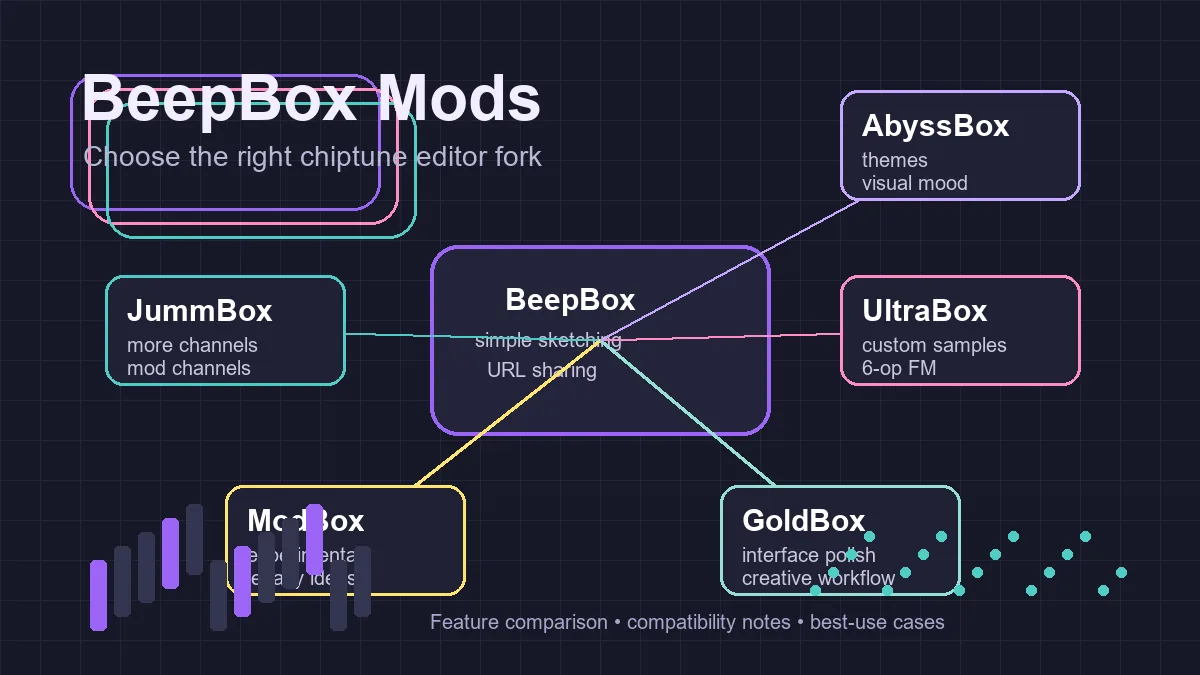
BeepBox mods solve different workflow problems: simplicity, extra channels, sample import, themes, automation, and deeper synthesis.
In this guide
What Counts as a BeepBox Mod?
A BeepBox mod is usually a fork, remix, or extended version of BeepBox, the browser-based song editor created by John Nesky. Most mods keep the same core idea: patterns, bars, channels, instruments, and shareable song URLs. The differences appear in the limits and creative controls around that core.
Some mods add more channels. Others add mod channels, deeper FM synthesis, visual themes, sample import, extra instruments, or experimental sound engines. A few are mostly historical: useful to understand the community, but not always the best place to start a new project today.
That means "best BeepBox mod" is not a single universal answer. The right question is: what part of BeepBox is limiting your current song? If you need a faster sketchpad, stay simple. If you need richer production, move to a broader fork such as UltraBox.
BeepBox Mods Compared
The table below focuses on practical creative fit rather than trying to preserve every historical detail of the modding family. It is designed for users deciding what to open today.
| Editor | Best for | Strengths | Tradeoffs |
|---|---|---|---|
| BeepBox | Fast melody sketches, simple loops, classrooms, game jams | Very easy to learn, stable, no account, shareable URLs | Limited channels and fewer advanced sound design options |
| JummBox | Users who want a stronger BeepBox without a huge jump in complexity | More arrangement space, mod channels, familiar workflow | Less complete than UltraBox for samples, themes, and deep synthesis |
| UltraBox | Advanced chiptune, full songs, custom samples, FM synthesis, theming | Combines many BeepBox mod ideas into one editor with custom samples, 6-op FM, expanded channels, and modern workflow tools | More menus and options than vanilla BeepBox |
| ModBox | Exploring older or experimental BeepBox-family ideas | Historically important and useful for understanding mod evolution | Not the most complete option for a new production workflow |
| GoldBox | Users curious about interface refinements and alternate BeepBox forks | Interesting UI and workflow ideas in the broader mod ecosystem | Usually less compelling than UltraBox for broad feature coverage |
| AbyssBox | Users who specifically want choptop84's UltraBox-derived fork | Distinct AbyssBox release, theme direction, and community context | Use the AbyssBox vs UltraBox guide before treating it as a drop-in UltraBox replacement |
| Slarmoo's Box | Advanced envelope design, granular and ring-mod textures, song EQ, and expanded unisons | An active UltraBox fork with specialized sound-design controls and selective randomization | Read Slarmoo's Box vs UltraBox before moving a fork-specific song between editors |
Which BeepBox Mod Should You Use?
The safest choice is to match the editor to the stage of your song. Do not open the most powerful tool just because it exists. Open the tool that removes the next blocker in your workflow.
| Your priority | Start with | Why |
|---|---|---|
| Fast, simple browser composition | BeepBox | The smallest feature set is easier to learn and share. |
| More channels and deeper synthesis | UltraBox | It expands arrangement, FM, effects, modulation, and sample workflows. |
| A middle ground with a familiar mod workflow | JummBox | It offers substantial extensions without requiring every UltraBox feature. |
| A specific visual style or experimental fork feature | The matching specialist mod | Choose it only after confirming maintenance, export, and song compatibility. |
If your real decision is JummBox or UltraBox, compare the editors by the project you need to finish rather than by feature count alone. The JummBox vs UltraBox comparison explains the workflow tradeoffs, while the UltraBox vs BeepBox guide covers the simpler baseline choice.
| Your priority | Start with | Why |
|---|---|---|
| Fast, simple browser composition | BeepBox | The smallest feature set is easier to learn and share. |
| More channels and deeper synthesis | UltraBox | It expands arrangement, FM, effects, modulation, and sample workflows. |
| A middle ground with a familiar mod workflow | JummBox | It offers substantial extensions without requiring every UltraBox feature. |
| A specific visual style or experimental fork feature | The matching specialist mod | Choose it only after confirming maintenance, export, and song compatibility. |
If your real decision is JummBox or UltraBox, compare the editors by the project you need to finish rather than by feature count alone. The JummBox vs UltraBox comparison explains the workflow tradeoffs, while the UltraBox vs BeepBox guide covers the simpler baseline choice.
Use vanilla BeepBox when...
- You are learning how pattern-based chiptune works.
- You need a quick melody, bassline, or classroom demo.
- You want the fewest menus possible.
- Your song does not need custom samples or automation.
Use UltraBox when...
- You need more channels for a complete arrangement.
- You want to import custom samples by URL.
- You care about advanced FM synthesis and modulation.
- You want one editor that absorbs many BeepBox mod features.
For sample-based music
UltraBox is the practical choice because sample import is part of the workflow. You can use built-in sample libraries, host your own WAV, MP3, or OGG files, and bring in sounds extracted from SoundFonts. Start with the UltraBox samples guide if you want the general workflow, or use the SF2 to WAV guide if your source file is a SoundFont.
For FM synthesis
If your goal is sharp basses, metallic bells, expressive leads, or retro game soundtrack timbres, UltraBox gives you a deeper FM playground than the original BeepBox. The tradeoff is that you need to learn more controls. The upside is that you can keep the familiar BeepBox grid while using more serious sound design tools.
For choosing between UltraBox and BeepBox
If you are comparing only those two, read the full UltraBox vs BeepBox guide. In short, BeepBox wins on simplicity and speed. UltraBox wins when the project grows beyond a quick sketch.
For choosing between JummBox and UltraBox
If your shortlist is already down to JummBox and UltraBox, use the dedicated JummBox vs UltraBox comparison. JummBox is often the calmer next step after vanilla BeepBox, while UltraBox is the stronger fit for custom samples, larger arrangements, and offline work.
For choosing between AbyssBox and UltraBox
If you searched for AbyssBox by name or found an AbyssBox song link, use the focused AbyssBox vs UltraBox guide. It explains when to open choptop84's AbyssBox fork directly and when UltraBox is the broader, better-documented workflow for samples, offline builds, and larger arrangements.
For choosing between Slarmoo's Box and UltraBox
If your priority is programmable envelopes, granular synthesis, ring modulation, song EQ, or dense unisons, read the focused Slarmoo's Box vs UltraBox comparison. It verifies the current official version and explains when Slarmoo's specialized sound design is worth the extra migration and workflow complexity.
Recommendation: keep BeepBox bookmarked for tiny ideas, then move the song into UltraBox when you need more channels, samples, themes, automation, or richer synthesis. That gives you the cleanest learning curve without locking you into a limited editor.
What "Modded BeepBox" Usually Means
Search results and community posts often use "modded BeepBox" loosely. Sometimes it means a specific fork such as JummBox or UltraBox. Other times it means any browser editor that starts from BeepBox's grid and adds extra controls. When you see that phrase, check which feature the person actually needs: more channels, custom samples, visual themes, mod channels, or a different sound engine.
This matters because the best modded BeepBox choice changes by use case. A beginner who only wants a bigger sketchpad may not need UltraBox yet. A producer building a full chiptune track with imported drums probably should start in UltraBox. A user studying older community forks may want to compare JummBox, ModBox, GoldBox, and AbyssBox before deciding.
| Search phrase | Likely intent | Best next page |
|---|---|---|
| beepbox mods | Compare forks and choose an editor | This guide |
| modded beepbox | Find an extended BeepBox-style editor | This guide, then UltraBox vs BeepBox or JummBox vs UltraBox |
| beepbox songs | Find examples or shared song URLs | BeepBox Songs guide |
| ultrabox download | Get official offline files | UltraBox download guide |
Song Compatibility and Migration
One reason the BeepBox family works so well is that many forks preserve the mental model of the original editor. Notes still live in patterns. Patterns still live in bars. Songs are still easy to share as URLs. This makes moving from BeepBox to a more capable fork feel natural.
UltraBox can open BeepBox song URLs, so it is a practical upgrade path for old sketches. Open the editor, paste the BeepBox song URL, and then save or share the resulting UltraBox version when you start using features that BeepBox does not support.
The reverse path is where you need caution. A song that uses custom samples, expanded channels, 6-op FM, mod channels, or UltraBox-specific instrument settings may not survive cleanly if opened in a simpler editor. Before collaborating, agree on which editor is the source of truth. For serious projects, keep a stable UltraBox URL and export audio when you need a non-editable reference.
Common Mistakes When Choosing BeepBox Mods
Choosing the biggest editor before learning the basics
More controls do not automatically produce a better song. If you are new, spend an hour in BeepBox or a simple JummBox-style workflow first. Learn patterns, bars, channels, scale, tempo, and instrument selection. Then UltraBox will feel like an expansion instead of a wall of menus.
Assuming every fork supports every song feature
"BeepBox-compatible" does not mean every advanced feature travels both directions. Treat vanilla BeepBox as the common base. Treat each mod's advanced features as editor-specific unless you have tested the song in the target editor.
Ignoring hosting requirements for samples
If a mod supports custom samples, the audio file still has to be reachable. UltraBox custom samples usually work best with direct, public, CORS-friendly audio URLs. A preview page, private link, or moved file can break the song even if the notes and instrument settings are correct. For song data export questions, use the audio to JSON guide.
Internal Resources for BeepBox Mod Users
New UltraBox users should start with the tutorials index, then read the features page to understand the synthesis engines, channel limits, themes, and modulation system. If you want offline files, use the official UltraBox download guide rather than third-party mirrors. If you are mainly looking for finished song examples, use the BeepBox Songs guide to find shared URLs, study patterns, and decide when a simple sketch should move into UltraBox.
For source and project verification, use the public UltraBox GitHub organization, the official UltraBox editor, and the original BeepBox website. Tool availability and feature details can change, so check the live editor before documenting a production workflow for a team or class.
Sources checked on May 29, 2026: the original BeepBox website, the official UltraBox editor, the UltraBox GitHub organization, the JummBox editor, and current search-result structures for "beepbox mods" and related queries.