How to Make BeepBox Songs Longer: 8 to 32 Bars
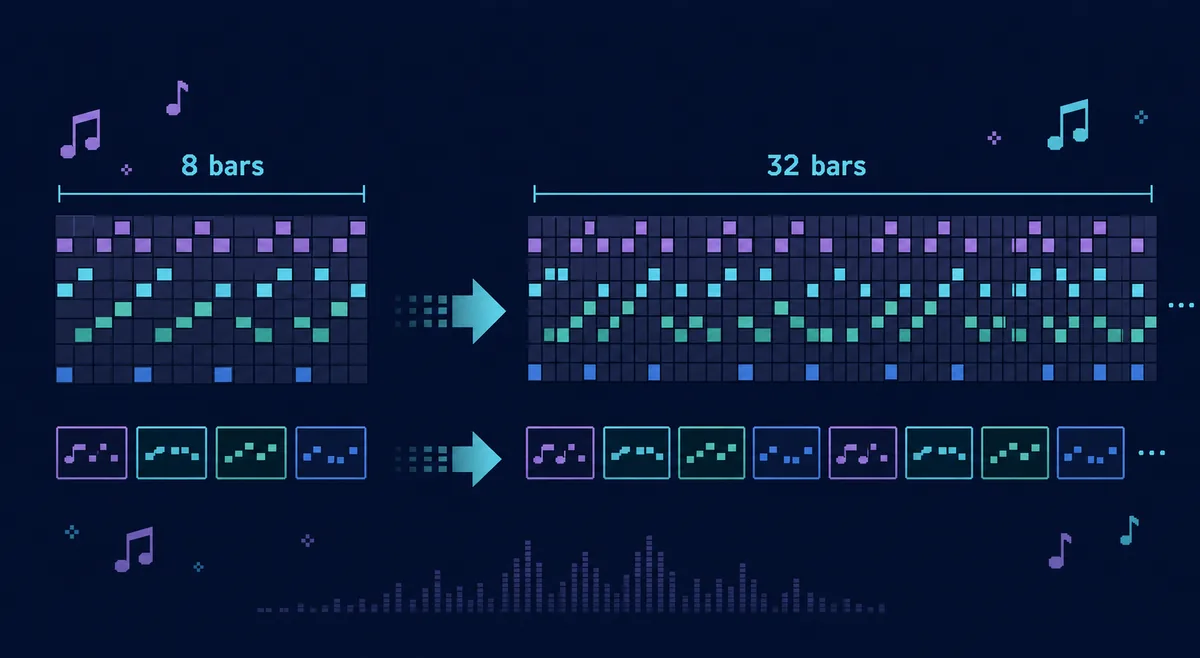
To make a BeepBox song longer, change the song length from the Edit menu, add or reuse pattern numbers in the new bars, and expand the loop region so playback covers the whole arrangement. An 8-bar idea can become a useful 16- or 32-bar song, but only if the added bars contain variation instead of the same pattern copied repeatedly.
Quick Navigation
How to Make BeepBox Songs Longer: The Short Answer
If you are asking can you make BeepBox songs longer, yes: adjust two separate things, the song length and the pattern layout. Song length controls how many numbered boxes exist across the timeline. Patterns control what each channel plays in those boxes. The loop handle controls which part repeats while you are listening.
A reliable example is 8 bars → 16 bars → 32 bars. First extend the timeline, then reuse a main pattern, add a variation and fill, and finally widen the loop region. Increasing the number of bars without changing the pattern layout makes the file longer but does not make the music feel longer.
| Goal | What to change | What to check after |
|---|---|---|
| Make the timeline longer | Use the editor's song length setting from the Edit menu. | New numbered boxes should appear across the song timeline. |
| Add musical variety | Create additional pattern numbers for melody, bass, chords, or drums. | Each section should have a clear role: intro, main idea, variation, fill, or ending. |
| Hear the whole song | Drag the loop region so it covers the full arrangement. | Playback should move through the new bars instead of repeating only the first section. |
| Share safely | Copy the complete updated URL after editing. | Open the link in a fresh tab before sending it to someone else. |
How to Change the Song Length
In current BeepBox-style editors, the song-length control is usually found in the Edit menu. Use it when you need more numbered boxes across the top of the song grid. If you are working in UltraBox, the same arrangement concept applies, but the extra channels, samples, and modulation options make it easier to build a track that stays interesting over a longer runtime.
- Open the Edit menu. Look for the song size or song length option. The wording can vary across BeepBox versions and forks, but the purpose is the same: it changes the number of bars available in the timeline.
- Increase the length gradually. If your song is 8 bars, try 16 or 32 before jumping to a huge number. It is easier to arrange a compact song well than to fill a very long empty grid.
- Copy useful pattern numbers into the new space. Use the existing pattern as a base, then alter rhythm, notes, octave, instrument, or drum hits so the new section is not identical.
- Play from the beginning and from section starts. Check whether transitions make sense. A longer song often fails at the joins between sections, not inside the individual patterns.
Important: More Bars Are Not the Same as More Music
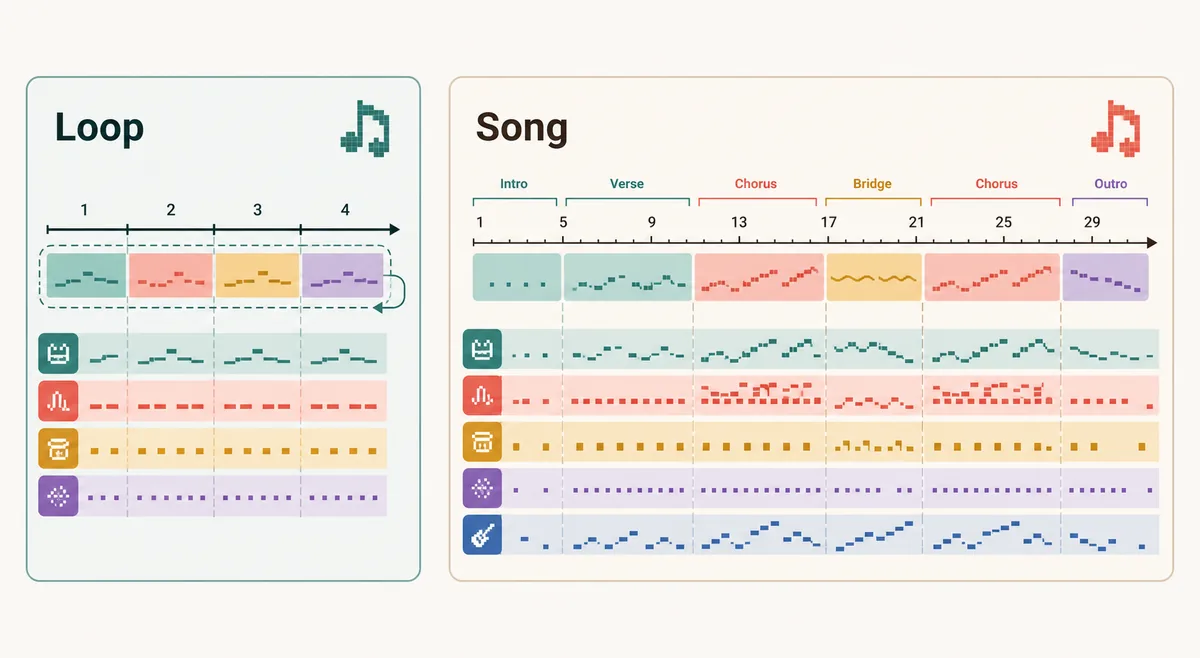
A longer BeepBox song needs structure. If the first 4 bars repeat eight times, listeners will still hear it as a short loop. Add contrast by changing one layer at a time: remove drums for an intro, add bass in the second pass, create a busier melody for the next section, and use a fill before the final repeat.
Use More Patterns Without Making the Song Hard to Edit
Patterns are the building blocks inside each channel. You do not need a unique pattern for every bar. In fact, that can make the song harder to revise. A practical approach is to create a small set of reusable pattern roles.
| Pattern role | Use it for | Example |
|---|---|---|
| Main pattern | The core melody, bass, chord, or drum groove. | Pattern 1 plays during the first full section. |
| Variation | A small change that keeps the section fresh. | Pattern 2 changes the last two notes or adds a syncopated drum hit. |
| Fill | A short transition before a new section. | Pattern 3 adds a drum roll, rising notes, or a held chord. |
| Dropout | A quieter moment that creates space. | Pattern 4 removes the lead or uses only bass and drums. |
Why the Song Still Repeats the First Few Bars
If you extended the song but playback still repeats only the old section, check the loop region. BeepBox uses a visible loop control under the numbered boxes. Older BeepBox instructions describe the purple loop as the control for which part of the song repeats: move it to hear another area or drag the ends to include more of the song.
This is useful while composing because you can focus on one section. It is also confusing when you forget it is active. After changing song length, drag the loop ends to cover the whole song, then listen from the beginning. If the full song now plays, the problem was not your patterns. It was only the preview loop.
A Simple 32-Bar BeepBox Arrangement Plan
Here is a reliable structure for turning an 8-bar idea into a 32-bar song. It works in BeepBox, UltraBox, and many BeepBox mods because it does not depend on a specific instrument feature.
| Bars | Section | What to do |
|---|---|---|
| 1-4 | Intro | Use a thinner version of the main idea: melody only, chords only, or drums without the full lead. |
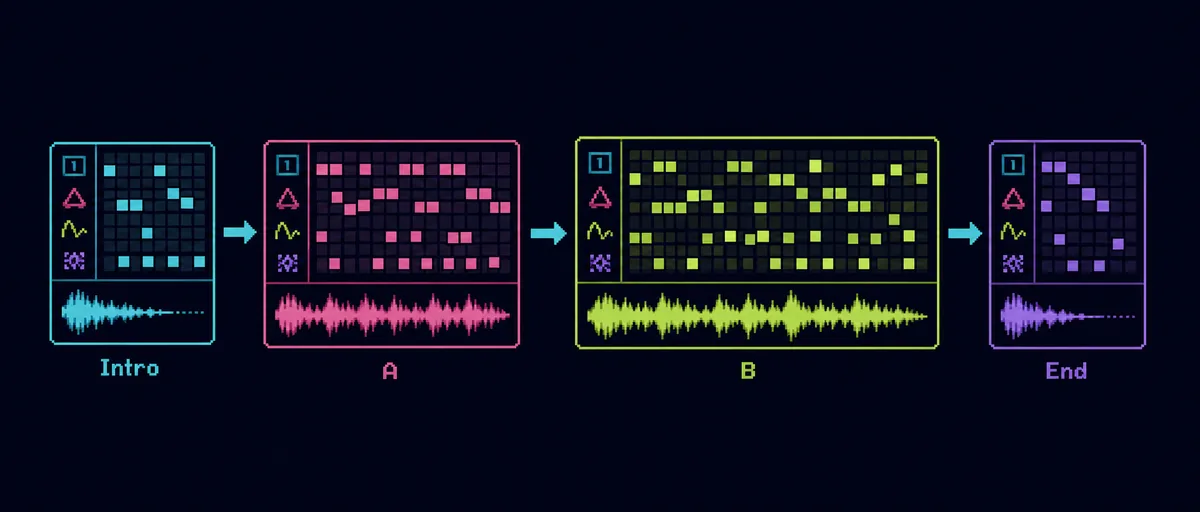
| 5-12 | Main A | Play the full groove. Keep the strongest melody or rhythm here so the listener understands the song. |
| 13-16 | Fill or lift | Add a drum fill, rising notes, filter change, or short silence before the next part. |
| 17-24 | Variation B | Change the lead pattern, bass rhythm, chord movement, or instrument color while keeping the same tempo. |
| 25-32 | Return or ending | Bring back the main idea, then remove layers or write a final cadence so the song feels finished. |
When to Move from BeepBox to UltraBox
If your only problem is song length, BeepBox can often handle it. If the track feels flat after you extend it, UltraBox may help because it gives you more arrangement tools: more channels, richer synthesis, custom samples, and modulation. Those features matter when a song needs contrast over time.
For example, you might keep the same 32-bar structure but use UltraBox to add a custom drum sample in the second half, automate a filter sweep before the return, or layer a wider harmony without running out of channels. If you are choosing between editors, read the UltraBox vs BeepBox comparison and the BeepBox mods guide.
If your longer loop is meant to sound like real retro game music, pair this arrangement workflow with the authentic chiptune music guide. It explains how to keep lead, bass, support, and noise lanes disciplined before adding UltraBox's extra channels.
Common Mistakes That Make Long Songs Feel Repetitive
- Repeating every channel at once: keep the bass steady if needed, but change the melody, drums, or harmony in at least one section.
- Adding too many patterns too early: make one good main pattern, one variation, and one fill before creating a large pattern library.
- Forgetting silence: a short dropout can make the next full section feel stronger.
- Leaving the loop region too small: always test the full arrangement before saving or sharing.
- Saving only an audio export: if you want to edit later, keep the complete song URL and any project backup. The UltraBox saving guide explains that workflow.
FAQ
How do I make a BeepBox song longer?
Change the song length from the Edit menu, then place pattern numbers into the new bars. After that, expand the loop region so playback covers the new timeline.
Can you make BeepBox songs longer?
Yes. Change the song length, add pattern numbers to the new bars, and expand the loop region. For a practical first pass, turn an 8-bar idea into 16 bars, then add a variation or fill before extending it to 32 bars.
Why did the song get longer but sound exactly the same?
You probably copied the same pattern across the whole song. Keep the main pattern, but add small variations, fills, dropouts, or a second section so the longer timeline has musical contrast.
How do I add more patterns in BeepBox?
Use the editor's channel or song settings to allow more pattern numbers when needed. Then assign those numbers in the timeline. Do not add more patterns than you can easily manage.
Can I make a full song from a 4-bar BeepBox loop?
Yes. A 4-bar loop can become a full song if you create an intro, main section, variation, transition, and ending. The arrangement matters more than the starting length.
Sources and Related References
- BeepBox official site for the core browser-based song editor and URL-sharing model.
- BeepBox 2.3 instructions for the loop-region behavior under the numbered boxes.
- UltraBox official editor for the current UltraBox interface and feature context.
- UltraBox source repository for the open-source project background.
Ready to Extend Your Loop?
Open UltraBox, duplicate your strongest pattern, and build a 16- or 32-bar version before adding more complexity.